Wolfram Alpha
In this lesson, we’ll give you some guidelines on how to use Wolfram Alpha to study and deepen your understanding of derivatives.
Wolfram Alpha is useful because it lets you:
- Check your derivative calculations to make sure they’re correct.
- View graphs of functions and their derivatives to better interpret their meaning.
- Get clear, step-by-step explanations that help you understand the process.
Below, you’ll find some examples of how to use it.
1. Calculating the Derivative of a Function
You can calculate a function’s derivative using Wolfram Alpha. For example, if you want to find the derivative of  , simply type:
Command: 
Result: Wolfram Alpha will provide the derivative of the function, which is  .
.

2. Calculating the Derivative at a Given Point
You can evaluate the derivative of a function at a given point. For example, if you want to find the derivative of  at
at  , simply type:
Command: 
Result: Wolfram Alpha will give the derivative value at that point, which is 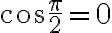 .
.

NOTE: Wolfram sometimes uses the notation “partial”  instead of
  to indicate the derivative.
3. Finding the Tangent Line to a Function at a Given Point
Example: Find the equation of the tangent line to 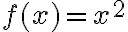 at
at  .
.
Command: 
Result: Wolfram Alpha will return the equation of the tangent line, which is  , along with the graph.

The tangent line in this case will have the equation , and in the graph, you will see the parabola 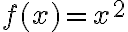 along with the tangent line at the point
 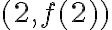 .
.
Therefore, in addition to performing calculations, Wolfram Alpha can also display the tangent line alongside the function's graph, making it easier to understand how the function changes at that point.
4. Calculating Higher-Order Derivatives (e.g., Second Derivative)
If you want to calculate the second derivative of a function, Wolfram Alpha can do it easily.
For example, let’s calculate the second derivative of 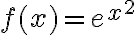 :
:
Command: 
Result: Wolfram Alpha will provide the second derivative, which is  .
.

5. Graphical Representation of the Derivative
You can visualize the graph of a function and its derivative. This is useful for observing how the function varies and how its slope changes visually.
Example: Plot the graph of  and its derivative.
Command: 
Result: Wolfram Alpha will display the graph of the original function and its derivative, allowing you to see where the function has maxima, minima, and inflection points.
