Blur a car plate - Challenge 1: Repeat the blur
Task
Apply repeatedly the 3 by 3 blurring kernel to the image of the full car plate, until the digits are no longer recognizable.

Figure 1: Original image on the left and filtered image after applying the blur 20 times on the right.
After 20 blurring iterations, the image has been completely blurred and the numbers are no longer recognizable. Notice that a black outline has appeared around the image, even though the original one does not have many black pixels in that region: this is due to the black padding that has been added at each iteration. The zero padding pixels are averaged with the image ones, effectively darkening the result. More sophisticated padding techniques can be used to avoid this effect, such as creating a padding that repeats the values of the pixels on the image border.
In order to blur the image, we replace each pixel with its average with its 8 neighbors. Averaging pixel values has the effect of smoothing the image: a light smoothing effect can be used to remove noise from an image, while a more aggressive smoothing can erase details altogether.
We formalized this procedure as a discrete convolution, denoted with the symbol  , between
the input image
, between
the input image  and a second matrix
  , called kernel: given an input image
 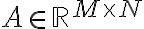 ,
a kernel
,
a kernel  , the discrete convolution of and is an image
 , defined as:

The gray-level value of each pixel of the output image  is the weighted sum of pixels in the
 neighborhood around the corresponding pixel in the input image, with the weights
equal to the elements of the kernel.
neighborhood around the corresponding pixel in the input image, with the weights
equal to the elements of the kernel.
To achieve this, we need to call im_filtering in a loop. At each iteration, we filter the
result of the previous one after having reapplied the padding using the for loop as follows:
# Number of times to apply the blur
N = 20

for i in range(N):
    R = im_filtering(Ap, K)
    # Reapply the padding to the blurred image
    Ap[1:-1, 1:-1] = R
The complete Python code for the solution is the following:
import numpy as np
from PIL import Image
from helper_functions import *

def local_convolution(A, K, i, j):
    v = 0
    for m in range(3):
        for n in range(3):
            v += A[i - 1 + m, j - 1 + n] * K[m, n]
    return v

def im_filtering(A, K):
    rows, cols = A.shape
    # Create an output matrix for the result
    R = np.zeros(shape=(rows - 2, cols - 2))

    for i in range(1, rows - 1):        # internal rows
        for j in range(1, cols - 1):    # internal columns
            R[i - 1, j - 1] = local_convolution(A, K, i, j)
    return R

# Load the image and convert it to gray scale
A = np.array(Image.open("plate.png").convert('L'))

# Create the convolution kernel
K = np.ones((3, 3)) / 9

# Padding
Ap = np.zeros((A.shape[0] + 2, A.shape[1] + 2))
Ap[1:-1, 1:-1] = A

# Number of times to apply the blur
N = 20

for i in range(N):
    R = im_filtering(Ap, K)
    # Reapply the padding to the blurred image
    Ap[1:-1, 1:-1] = R

compare_images(A, R)
To achieve this, we need to call im_filtering in a loop. At each iteration, we filter the
result of the previous one after having reapplied the padding using the for loop as follows:
% Number of times to apply the blur
N = 20

for i = 1 : 20
    R = im_filtering(Ap, K)
    % Reapply the padding to the blurred image
    Ap(2 : end - 1, 2 : end - 1) = R
end
The complete Matlab code for the solution is the following:
% Load the image and convert it to gray scale
A = double(rgb2gray(imread("plate.png")));

% Create the convolution kernel
K = ones(3, 3) / 9;

% Padding
Ap = zeros(size(A, 1) + 2, size(A, 2) + 2);
Ap(2 : end - 1, 2 : end - 1) = A;

% Number of times to apply the blur
N = 20;

for i = 1 : 20
    R  = im_filtering(Ap, K);
    % Reapply the padding to the blurred image
    Ap(2 : end - 1, 2 : end - 1) = R;
end

R = uint8(R);
compare_images(A, R)