Blur a car plate - Challenge 2: Enlarge the kernel
Task
Try blurring the image of the full car plate by applying the following 5 by 5 kernel: 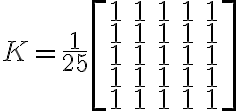 .
.

Figure 1: Original image on the left and filtered image on the right.
As we can see, the blur produced by the bigger 5 by 5 kernel is more noticeable with respect the 3 by 3, because we are averaging together more pixels than before. However, it is overall still quite soft and not sufficient to hide the details in the image; a possible solution is to apply the filter multiple times like we did in the previous exercise.
The idea beyond this kernel is simple and similar to the ones of size 3 by 3: to blur the image we average the value of neighboring pixels, but instead of considering a 3 by 3 square we consider all pixels in a 5 by 5 square centered on the current pixel. This means that we are taking the average of 25 pixels instead of 9, and so the blurring effect will be more pronounced.
Given that a 5 by 5 kernel extends in each direction by 2 pixels from the central one, it can be applied only on those pixels that are at least 2 rows and 2 columns distant from the outside border of the image. Consequently, the resulting image will be smaller: if the original image is  pixels, the result will be
  . We can remedy this by padding the input image like we did in the lecture, except now the padding will be 2 pixels wide.
First of all, we need to define the new blurring kernel. We can do it by creating a 5 by 5 matrix of ones and dividing it by 25: K = np.ones((5, 5))/ 25. Next, we need to modify the local_convolution function so that it correctly loops over the bigger kernel, by using range(5) instead of range(3). When accessing the image A, we also need to change the shift from -1 to -2 for the same reason.
def local_convolution(A, K, i, j):
    v = 0
    for m in range(5):
        for n in range(5):
            v += A[i - 2 + m, j - 2 + n] * K[m, n]
    return v
We also need to slightly modify the im_filtering function: the result is now a  image and the nested
 for loops must exclude 2 rows and 2 columns on each side of the image. The shift for saving the result in R must also be changed to -2.
def im_filtering(A, K):
    rows, cols = A.shape
    # Create an output matrix for the result
    R = np.zeros(shape=(rows - 4, cols - 4))

    for i in range(2, rows - 2):        # internal rows
        for j in range(2, cols - 2):    # internal columns
            R[i - 2, j - 2] = local_convolution(A, K, i, j)

    return R
Finally, we add a bigger padding, creating a  image, to counteract this loss.
Ap = np.zeros((A.shape[0] + 4, A.shape[1] + 4))
Ap[2:-2, 2:-2] = A
The complete Python code for this challenge is:
import numpy as np
from PIL import Image
from helper_functions import *

def local_convolution(A, K, i, j):
    v = 0
    for m in range(5):
        for n in range(5):
            v += A[i - 2 + m, j - 2 + n] * K[m, n]
    return v

def im_filtering(A, K):
    rows, cols = A.shape
    # Create an output matrix for the result
    R = np.zeros(shape=(rows - 4, cols - 4))

    for i in range(2, rows - 2):        # internal rows
        for j in range(2, cols - 2):    # internal columns
            R[i - 2, j - 2] = local_convolution(A, K, i, j)
    return R

# Load the image and convert it to gray scale
A = np.array(Image.open("plate.png").convert('L'))

# Create the convolution kernel
K = np.ones((5, 5)) / 25

# Padding
Ap = np.zeros((A.shape[0] + 4, A.shape[1] + 4))
Ap[2:-2, 2:-2] = A

R = im_filtering(Ap, K)
compare_images(A, R)
First of all, we need to define the new blurring kernel. We can do it by creating a 5 by 5 matrix of ones and dividing it by 25: K = ones(5, 5)/ 25. Next, we need to modify the local_convolution function so that it correctly loops over the bigger kernel, by letting m and n be equal to the range 1:5 instead of 1:3. When accessing the image A, we also need to change the shift from -2 to -3 for the same reason.
function [v] = local_convolution(A, K, i, j)
    v = 0;
    for m = 1:5 % kernel rows
        for n = 1:5 % kernel columns
            v = v + A(i - 3 + m, j - 3 + n) * K(m, n);
        end
    end
end
We also need to slightly modify the im_filtering function: the result is now a image and the nested for loops must exclude 2 rows and 2 columns on each side of the image. The shift for saving the result in R must also be changed to -2.
function [R] = im_filtering(A, K)
    [rows, cols] = size(A);
    % Create an output matrix for the result
    R = zeros(rows - 4, cols - 4);

    for i = 3:rows - 2 % internal rows
        for j = 3:cols - 2 % internal columns
            R(i - 2, j - 2) = local_convolution(A, K, i, j);
        end
    end
end
Finally, we add a bigger padding, creating a image, to counteract this loss.
Ap = zeros(size(A, 1) + 4, size(A, 2) + 4);
Ap(3:end - 2, 3:end - 2) = A;
The complete Matlab code for this challenge is the following:
function [v] = local_convolution(A, K, i, j)
    v = 0;
    for m = 1:5 % kernel rows
        for n = 1:5 % kernel columns
            v = v + A(i - 3 + m, j - 3 + n) * K(m, n);
        end
    end
end

function [R] = im_filtering(A, K)
    [rows, cols] = size(A);
    % Create an output matrix for the result
    R = zeros(rows - 4, cols - 4);

    for i = 3:rows - 2 % internal rows
        for j = 3:cols - 2 % internal columns
            R(i - 2, j - 2) = local_convolution(A, K, i, j);
        end
    end
end

% Load the image and convert it to gray scale
A = double(rgb2gray(imread("plate.png")));

% Create the convolution kernel
K = ones(5, 5) / 25;

% Padding
Ap = zeros(size(A, 1) + 4, size(A, 2) + 4);
Ap(3:end - 2, 3:end - 2) = A;

R = im_filtering(Ap, K);
R = uint8(R);
compare_images(A, R)